
The Problem: Why Professional Images Matter (And Why They're So Hard to Get)
Every Amazon listing needs 9 high-quality images to convert browsers into buyers. Research shows professional photos increase conversion rates by 33-94%. Amazon's A9 algorithm also favors complete, high-quality image sets.
But here's the reality for most Amazon sellers:
- •Hiring photographers costs $500-2,000 per shoot — impossible when managing dozens of SKUs. One seller reported spending $15,000 on product photography in their first year alone.
- •DIY photography takes 3-5 hours per product — setting up lighting, shooting multiple angles, editing in Photoshop. That's 150-250 hours for 50 products.
- •Photoshop and Canva have steep learning curves — and still require manual work for each variation. Most sellers give up after struggling with masking tools and layer adjustments.
- •Managing multiple SKUs multiplies the problem exponentially — 50 products × 9 images = 450 images to create, edit, and maintain. Any brand refresh means redoing everything.
- •Generic AI tools require clean photos and perfect prompts — defeating the purpose. You still need photography skills to get good results.
The result? Sellers either upload low-quality phone photos (killing conversion rates) or spend thousands on photographers (destroying profit margins). There's no middle ground... until now.
Most Amazon sellers we talk to have a box of products sitting in their spare room, shot with an iPhone against a wrinkled bedsheet, because they can't justify hiring a photographer yet. But they know these amateur photos are costing them sales every single day.
How GreenOnion Solves It
GreenOnion uses AI to automatically generate 9 professional Amazon product images from a single upload — in under 60 seconds. No templates. No prompts. No design skills.
Step 1: Upload Product Image
Upload any product photo — kitchen counter, bedroom floor, cluttered background. GreenOnion accepts messy snapshots and extracts your product automatically. You can upload multiple images (up to 5) to give the AI more context.
Step 2: Add Product Description (Optional)
Optionally add a product description to help the AI understand your product better. Include key features, benefits, target audience, or any specific design preferences (colors, fonts, style). This helps the AI generate more accurate and relevant copy and images.
Step 3: Analyze Product & Assign Features
AI analyzes your product image and description to extract key features, selling points, and design style. It then intelligently assigns specific features to each of the 9 image slots based on their purpose (Main Image, Core Value Prop, Key Features, Usage Scenario, Quality/Origin, Detail/Close-Up, Size/Quantity, Comparison, Lifestyle). This ensures each image has a clear, distinct role in your listing.
Step 4: Generate Design Specifications
AI creates comprehensive design plans for all 9 images. These design specifications serve as blueprints that ensure consistent, professional, and conversion-optimized visuals across all images.
Step 5: Generate Listing Copy
Based on the design specifications, AI generates optimized copy text (headlines and subheadlines) for each of the 9 product images. The copy is tailored to match each image's purpose and design plan, ensuring text and visuals work together harmoniously. The AI considers your product description, assigned features, and Amazon best practices to create compelling, conversion-focused copy.
Step 6: Edit Listing Copy
Review and edit the generated copy for each of the 9 images. You'll see 9 text fields (one for each image) where you can customize the copy to match your brand voice, emphasize specific features, or adjust the messaging. This ensures the final images perfectly represent your product.
Step 7: Configure Settings
Select your preferred aspect ratio (1:1 for Amazon listings). The system is pre-configured for Amazon compliance, so images will automatically meet all requirements including white backgrounds and correct dimensions.
Step 8: Generate 9 Professional Images
With one click, AI generates all 9 professional variations using your edited copy and settings:
- Main/Hero Image: Product-only with Amazon-compliant pure white background (RGB 255,255,255), product fills 85%+ of frame
- Core Value Prop: Primary selling point and key benefit explanation with compelling visuals
- Key Features: Multiple feature highlights, specifications, and color options showcase
- Usage Scenario: How to use, applications, and compatible materials/surfaces
- Quality/Origin: Materials, certifications, construction details, and durability proof
- Detail/Close-Up: Macro details, texture shots, and component close-ups
- Size/Quantity: Dimensions, package contents, and scale reference comparisons
- Comparison: Versus competitors, before/after transformations, and advantage highlights
- Lifestyle: Product in-use, tutorials, aspirational contexts, and real-world demonstrations
All images are automatically formatted to Amazon's specifications. Amazon requires: white background RGB 255,255,255, minimum 1000px dimensions. Download and upload directly to your Amazon listing — no editing needed.
Real Example
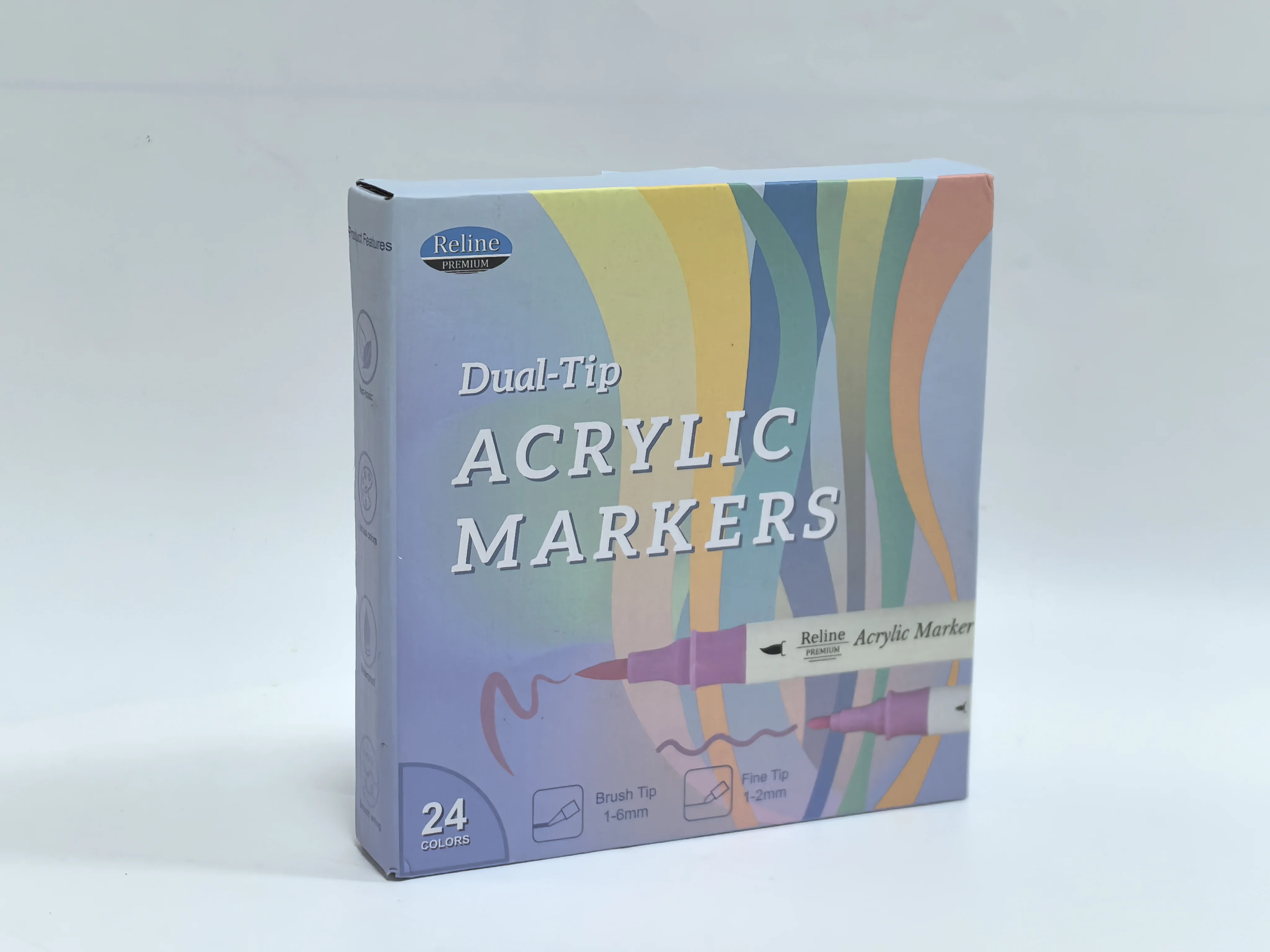
Simple smartphone photo on a plain surface
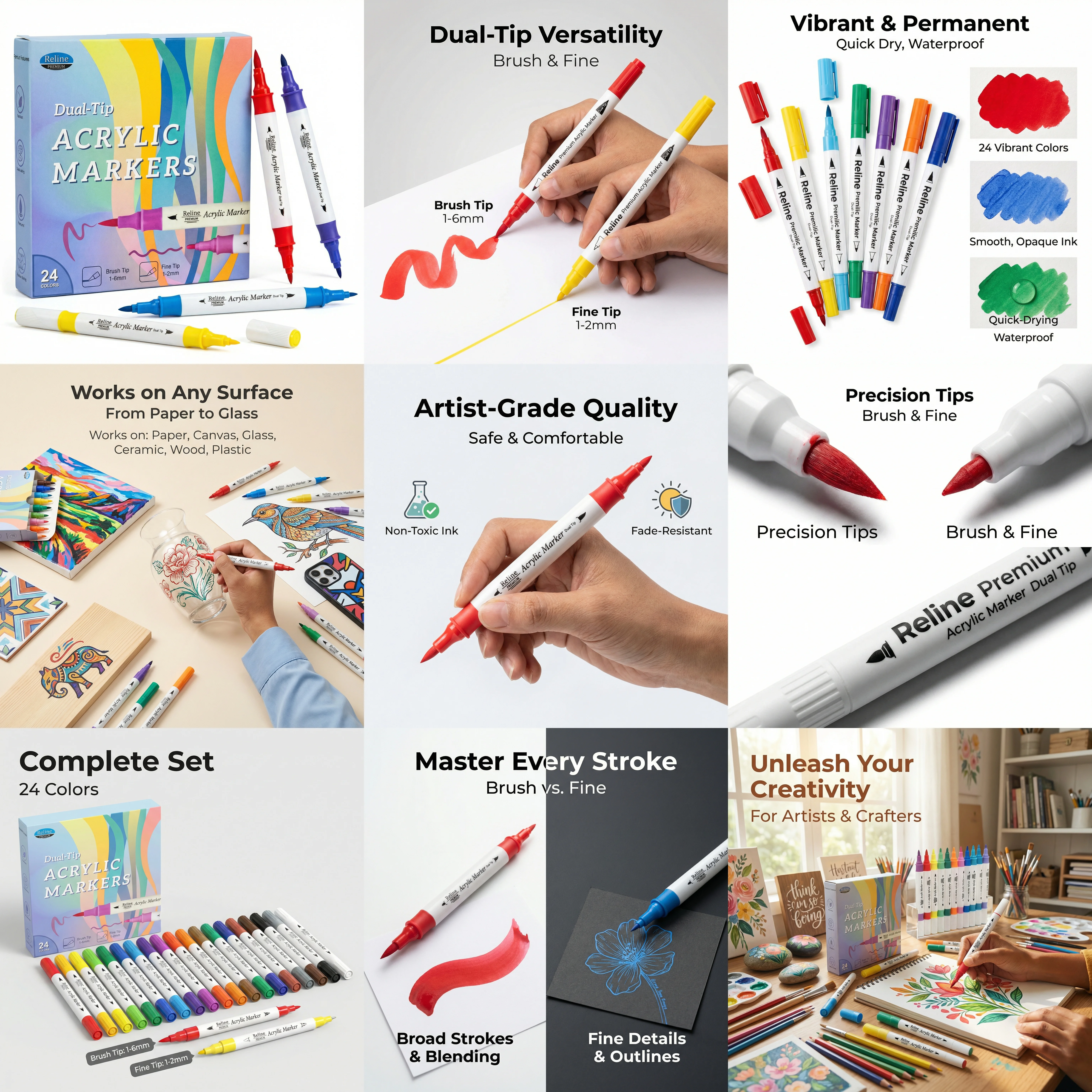
9 professional variations: Hero image, Infographics, Lifestyle shots, Comparison images, and more
Why Amazon Sellers Choose GreenOnion
Bulk Generation at Scale
Process entire product catalogs in minutes. 50 products? Upload 50 photos, get 450+ professional images instantly.
Amazon Compliance Guaranteed
All images automatically meet Amazon's strict requirements. Amazon requires: white background RGB 255,255,255, minimum 1000px dimensions.
Massive Cost Savings
Professional photographer: $500-2,000 per shoot. GreenOnion: $4.90 per 9-image set. Save $6,000-24,000 per year.
Brand Consistency
AI maintains your brand aesthetic across all variations. Every image looks cohesive and professional.
Cost Comparison: The Math That Matters
Creating Images for 10 Products
Cost per shoot: $500-2,000
10 products × 9 images = 90 images
Turnaround: 1-2 weeks
$5,000-20,000
+ reshoot fees for updates
Cost per product set: $200-800
10 products × $400 avg = $4,000
Turnaround: 3-5 days per set
$2,000-8,000
+ revision fees
Cost per 9-image set: $4.90
10 products × $4.90 = $49
Turnaround: 10 minutes total
$49
instant turnaround
Savings with GreenOnion:
$1,951 - $19,951
for just 10 products (97-99% cost reduction)
Revenue Impact: What Better Photos Actually Make You
Your listing gets 1,000 visitors per month
Conversion rate: 2%
Sales: 20 units/month
Revenue: $800/month
(at $40/product)
Conversion rate: 3.5%
Sales: 35 units/month
Revenue: $1,400/month
(same $40/product)
ROI: 3,058% (you make $30.58 for every $1 spent)
Data based on research showing 33% higher conversion rates with professional photos
💡 Real seller example: One Amazon seller with 50 SKUs saved $18,000 in year one by switching from designers ($400/set × 50 = $20,000) to GreenOnion ($49 for all 50 products). They reinvested those savings into inventory and increased revenue by 40%.
| Method | Cost (10 products) | Time | Revisions |
|---|---|---|---|
| 📸 Photographer | $5,000-20,000 | 1-2 weeks | $100-500 each |
| 🎨 Designer | $2,000-8,000 | 3-5 days | $50-200 each |
| ⚡ GreenOnion AI | $49 | 10 minutes | Instant |
Frequently Asked Questions
How long does it take?
GreenOnion generates 9 professional Amazon product images in 30-60 seconds from a single upload. Traditional methods take significantly longer: DIY photography requires 3-5 hours per product for lighting setup, shooting, and Photoshop editing, while professional photographers typically need 1-2 weeks including scheduling and revisions.
Do the images meet Amazon's requirements?
Yes, all Studio-style images automatically meet Amazon's strict requirements. Amazon requires: white background RGB 255,255,255, minimum 1000px dimensions (we generate 1600px+), and product fills 85%+ of frame. No manual adjustments needed.
Does it really work with messy photos?
Yes. Our AI is designed to extract products from imperfect photos—kitchen counters, bedroom floors, cluttered backgrounds. The AI automatically removes backgrounds and creates professional images. However, better input photos will generally produce better results.
What types of images does it generate?
From a single upload, you get 9 professional variations: (1) Main/Hero Image - product-only with Amazon-compliant pure white background, (2) Core Value Prop - primary selling point and key benefit explanation, (3) Key Features - multiple feature highlights, specifications, and color options, (4) Usage Scenario - how to use, applications, and compatible materials, (5) Quality/Origin - materials, certifications, construction details, (6) Detail/Close-Up - macro details, texture shots, component close-ups, (7) Size/Quantity - dimensions, package contents, scale references, (8) Comparison - versus competitors, before/after, advantage highlights, (9) Lifestyle - product in-use, tutorials, aspirational contexts. All variations maintain your brand aesthetic.
How much does it cost compared to hiring a photographer?
Professional photographers charge $500-2,000 per shoot. For a seller with 10 products, that's $5,000-20,000. GreenOnion costs $4.90 per 9-image set, so 10 products cost just $49 total. This represents a 97-99% cost savings. For sellers managing 50 products, photographers cost $25,000-100,000 while GreenOnion costs $245 total, saving $24,755-99,755 per year. Photographers typically charge $100-500 per reshoot for updates.
Can I generate images for multiple Amazon products in bulk?
Yes, GreenOnion is designed for bulk processing. You can upload multiple product photos and generate images for your entire catalog. Traditional methods would require: 150-250 hours for DIY photography and editing, $25,000-100,000 for professional photographers, or weeks waiting for designers. With GreenOnion, you can launch entire product lines simultaneously, refresh your catalog for seasonal campaigns, and maintain brand consistency across all SKUs.
How does AI image generation improve Amazon conversion rates?
Research shows professional photos increase conversion rates by 33-94%. Professional images work because they: reduce buyer uncertainty, highlight key features clearly, demonstrate product quality, show real-world usage, differentiate from competitors, and build brand trust. Amazon's A9 algorithm also favors listings with complete, high-quality image sets.
Is the AI suitable for all Amazon product categories?
Yes, GreenOnion works excellently across all major Amazon product categories including Electronics, Beauty & Personal Care, Home & Kitchen, Health & Household, Clothing & Accessories, Sports & Outdoors, Toys & Games, Pet Supplies, and more. The AI adapts to category-specific requirements: for electronics, it highlights technical specifications and features; for beauty products, it emphasizes ingredients and benefits; for home goods, it showcases lifestyle applications. The system understands Amazon's category-specific image guidelines and automatically generates compliant, conversion-optimized images for each product type.
What if I need to update images for seasonal campaigns?
GreenOnion makes seasonal updates effortless. Simply upload your product photo again and generate new variations with holiday themes, seasonal backgrounds, or promotional graphics - all generated instantly. No need to reshoot products or hire designers for every campaign. For example, updating 50 products for Black Friday takes 10 minutes with GreenOnion, compared to $5,000-10,000 in reshoot fees with photographers. This flexibility allows sellers to test different seasonal variations and optimize for peak shopping periods without the traditional costs and delays.
Can I use my own design ideas, fonts, and color themes?
Yes! Simply include your design preferences in the product description when you upload. Our AI understands natural language instructions and will automatically incorporate your specifications. You can provide:
- Brand colors: Specify your color palette (hex codes, color names, or descriptions)
- Typography: Font family preferences, font styles, and text treatment guidelines
- Design principles: Visual style rules, layout preferences, information density limits
- Specific image requirements: Angles, compositions, text limits, material types, comparison points
- Style guidelines: Overall aesthetic direction (minimalist, luxury, tech-forward, lifestyle, etc.)
- Forbidden elements: Things to avoid (e.g., "no childish elements", "avoid excessive decoration")
- Platform requirements: Amazon compliance needs, white background specifications, etc.
You can describe all 9 images in detail, specify just a few key images, or provide general brand guidelines—our AI adapts to your level of detail and applies your brand identity consistently across all generated images.
Ready to scale your catalog?
Generate professional Amazon product images in bulk — without hiring designers or photographers.
Try GreenOnion Free